

Help by iorad is a widget that embeds directly inside Google Workspace apps and Salesforce, placing step-by-step tutorials inside the tools employees use every day without requiring them to leave the application to find training. When an employee encounters an unfamiliar feature in Gmail, Google Sheets, or Salesforce, etc, they can open the iorad help panel and find the relevant tutorial for exactly what they need to do.
The tutorial walks them through each step in sequence without opening a new tab or navigating to a separate knowledge base. This guide covers how Help by iorad works in both Google Workspace and Salesforce, how to set it up, and what training workflows it handles most effectively.
We offer the “Help by iorad” icon across many of the Google apps to provide “just in time” training. You’ll continue to see more & more tutorials released across these applications over time.
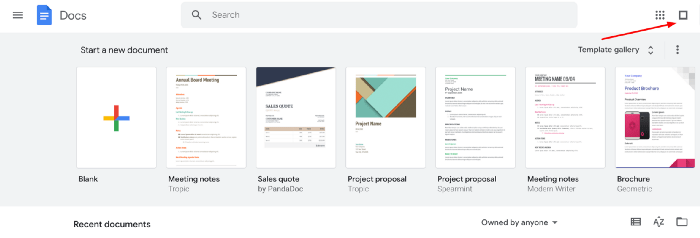
The Help By iorad icon is included but not limited to:
- Google Docs
- Gmail
- Google Drive
- Google Sheets
- Google Drawings
- Google Slides
- Google Classroom
- Google Meet
- Google Jamboard
- Google Sites
- Google Admin
- Google Analytics
Not only can you find a whole library of “Community Tutorials” in the “Help by iorad” icon but you can also share your own tutorials with your learners.
The iorad Help icon is included in Salesforce and many other common apps. This can be used as your internal “Help” icon where you can share training relevant with your team or organization for all of your Salesforce processes.
Help by iorad in Google Workspace
Google Workspace users encounter Help by iorad as a small panel icon that appears inside Gmail, Google Docs, Google Sheets, Google Drive, and other Workspace apps when the iorad integration is active. Clicking the icon opens a searchable list of tutorials scoped to that specific application.
An employee in Google Sheets looking for how to create a pivot table finds the tutorial in the panel and completes the steps in the same screen they are already working in. The integration supports organizations that have standardized on Google Workspace and want to provide contextual training without directing employees to a separate help center or intranet page.
Help by iorad in Salesforce
Salesforce is one of the most powerful and complex CRMs available, which makes it one of the most common sources of employee training requests. Help by iorad integrates directly with the Salesforce interface, making step-by-step tutorials available inside any Salesforce page without switching tools.
Sales reps learning how to log a deal, create a custom report, or set up an email sequence find the relevant tutorial in the iorad panel without leaving Salesforce. For sales enablement teams, this integration reduces the volume of repetitive training questions and removes the friction between recognizing a need and finding the answer. The result is faster Salesforce adoption and a smaller support burden on enablement and revenue operations teams.