
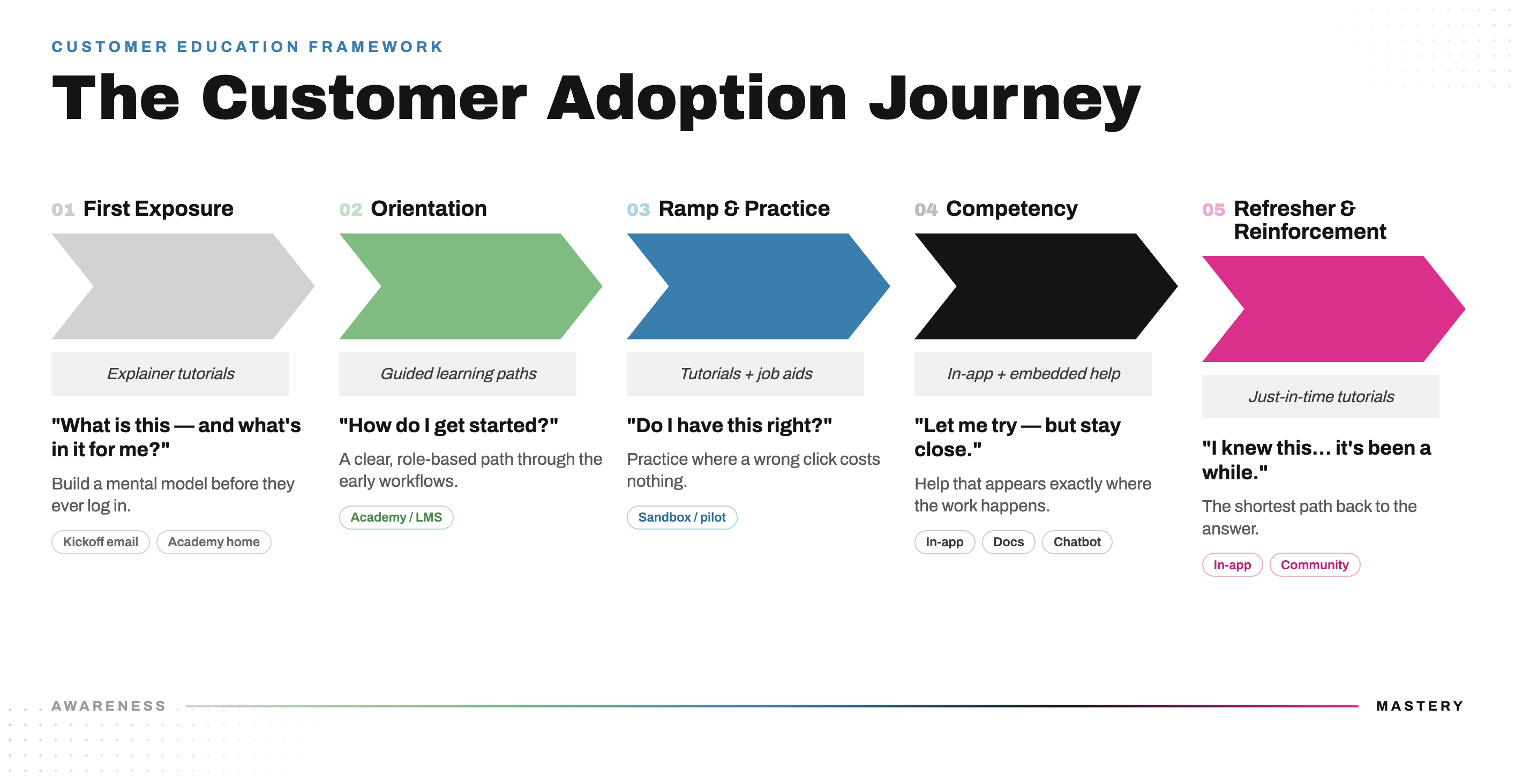
The customer adoption journey maps five stages every customer moves through when they adopt your product:
First Exposure, Orientation, Ramp and Practice, Competency, and Refresher and Reinforcement.
Most customer education programs address the first one or two stages and assume the rest follows. It doesn't. iorad helps customer education, customer success, and product teams build training that maps to each stage rather than shipping a single format and hoping it sticks. Interactive step-by-step tutorials accelerate first use. Just-in-time guidance reinforces ongoing use. This article walks through the framework and shows where each asset lives across the journey, from the kickoff email to the in-app overlay to the community.
There is one difference that sits underneath the whole thing, and it changes how you build. With internal training you have control. You can require completion, schedule the live session, and tie it to onboarding. With customers you have far less control. You cannot mandate a thing. You have to earn the visit, earn the click, and meet the customer wherever they happen to be in their journey. That constraint is the reason a single format fails faster in customer education than it does internally.
The customer adoption journey
Every customer moves through five predictable stages. Each stage asks a different question and needs a different type of support. When you understand that sequence, adoption becomes much easier. When you ignore it, no academy and no in-app tool will save you.
You have probably seen teams reach for the same default playbook:
"Let's build an academy."
"Let's record a webinar."
"Let's write a help doc."
"Let's buy a digital adoption platform."
None of these is wrong. But they are not a strategy. They are delivery mechanisms. Without a clear read on where the customer is in their journey, those mechanisms miss.
At iorad we spend all day inside adoption programs, customer-facing product launches, customer education academies, and onboarding rollouts. We see the same pattern every time. Teams over-index on tools and under-index on the customer's stage of adoption. The result is a customer who has seven places to learn, seven logins, and no idea which one to open. A customer education leader we talked with recently put it plainly: the academy had quietly turned into a support page, when what they wanted was a destination customers actually choose to visit.
The fix is not another tool. It is one tutorial, built once, placed at every stage where the customer is asking a question. The same interactive tutorial can sit in an onboarding email, inside an academy course, in a sandbox, behind an in-app widget, inside a help article, and in your community. One source of truth, distributed to where the customer already is. That is the thread running through all five stages below.
1. First Exposure: what is this and why does it matter
In practice: First Exposure
The work here happens around the kickoff call with the CSM, account manager, or implementation specialist. Before that call, you send a few higher-level explainer tutorials so the customer arrives with a feel for the system. After the call, you send the getting-started materials that make the early days easier.
The simplest version is a getting-started tutorial library, hyperlinked right inside the kickoff email. The customer clicks through a few short tutorials, gets a sense of the layout and the core actions, and shows up to kickoff with questions instead of a blank stare. The tutorials are not asking them to perform anything yet. They are setting the stage and making the change feel approachable.
This is the awareness stage. The customer is seeing the product for the first time, often before kickoff. They are not ready for deep training. They are not ready for steps and click paths. Their attention is on two questions:
What is this? Why should I care?
They need context, not clicks. They need a feel for the system and the lay of the land before anyone asks them to do anything. This is where you warm them up so that kickoff is productive instead of being the first time they have ever seen the product.
Best fit content: higher-level explainer tutorials, simple getting-started overviews, a short tour of where things live and what the product does.
Goal: get the customer ready before they ever log in. Build a basic mental model so the first real session builds on something instead of starting from zero.
Where it goes: kickoff email, academy homepage etc.
Why it matters: shows the low-pressure, lay-of-the-land view a customer gets before they log in
2. Orientation: how do I get started
Once the customer knows the purpose and the value, the next question is practical. They want to know how to begin. This stage creates structure. The customer needs direction and a clear path through the early workflows.
Best fit content: guided learning paths, step-based courses, onboarding lessons, role-based curriculum delivered inside the customer academy or university.
Goal: make the start simple and predictable inside a safe environment, before the customer is anywhere near the live product.
In practice: Orientation
This is the customer academy or university, the LMS layer of the journey. Tools like Skilljar host the guided learning paths where you tease out the product in a deliberate feel and flow. The customer works through courses that walk them along a specific sequence, and inside those courses the interactive tutorials let them click around and get the rhythm of each process. They are practicing the motions, but they are doing it in a safe course environment, not in the live product where a mistake has a cost.
A few things make this stage work. Role-based paths beat a single generic track, because an admin and an everyday user are not learning the same product. The customer can stack their learning, moving from foundational courses into deeper ones. And the same tutorials that teach the workflow inside a lesson also live in a reference library the customer can pull up in real time while they are still in the courseware, so they are never stuck waiting on a reply to get unblocked.
Where it goes: customer academy or university
Why it matters: shows the safe, guided, click-around environment before the customer touches the live product
3. Ramp and Practice: do I have this right
Now the customer wants to try the workflow for real, or close to real. They understand the general idea from the academy, but they need a place to practice and confirm they have it right. This is where muscle memory forms.
Best fit content: deeper tutorial libraries, click-through scenarios, and a pilot or sandbox account they can work in as often as they need.
Goal: create a low-consequence practice environment, with guidance available in the flow, so the customer builds real familiarity before anyone expects productivity.
In practice: Ramp and Practice
The customer moves into a pilot or sandbox account where they can work in something that behaves like the real product. What keeps them moving is the support sitting right alongside them. Additional tutorial libraries and job aids are available inside the sandbox, so when the customer hits a step they are unsure about, the reference is right there. They do not have to leave, dig through a course, or open a ticket.
This is the stage where the tutorial earns its keep as a working asset rather than a passive video. The customer is doing the workflow, getting a feel for the flow, and reaching for the job aid the moment a question comes up. They build confidence in an environment where a wrong click costs nothing.
- A tutorial library as it appears inside a sandbox or pilot account
- A job aid surfaced in the flow of a sandbox workflow
- Where it goes: pilot or sandbox account
- Why it matters: shows guidance available in the flow of practice, not buried in a separate course
Sample Library
4. Competency: let me try this, but stay close in case I need help
By now the customer knows the steps and is doing the real job in the live product. They are competent, not yet fluent. They need quiet support and reference while they work, without being pulled back into a course.
Best fit content: in-app guidance, contextual tooltips, embedded prompts, knowledge articles for deeper use cases, and tutorials surfaced inside chat support.
Goal: support success in the real workflow. Replace course-based guidance with help that shows up exactly where and when the customer needs it.
In practice: Competency
This stage spreads across several surfaces, because a working customer reaches for whatever is closest.
In the app, digital adoption tools like Pendo or Gainsight PX deliver the tooltips, flags, and pop-ups. iorad tutorials surface through an extension or a widget right inside the application, so the customer can pull up the exact how-to on the screen they are looking at without leaving the product. No portal switching, no second tab, no hunting.
For customers who want to go deeper into a feature or a new use case, the home is the knowledge base. You embed the same tutorials inside help articles in Zendesk, Document360, or wherever your docs live. The customer who is past the course stage, and not in the mood for an in-app nudge, can go straight to the help center and click through the tutorial there. You can take this one step further and place the tutorials inside your chatbot, so as the bot answers a how-to question it surfaces the matching iorad tutorial as the answer.
What to drop in:
- A Pendo or Gainsight PX tooltip paired with the iorad Site Help widget pulling a tutorial inside an app
- An embedded tutorial inside a help article (Zendesk or Document360)
- A chatbot reply that surfaces an iorad tutorial link
Where it goes: in-app, knowledge base, chatbot, community
Why it matters: shows the same tutorial meeting the customer across every surface they reach for while doing the real job, including peer-created content
5. Refresher and Reinforcement: I know how to do this, but it has been a while
Even skilled customers need reminders. Workflows that happen monthly or quarterly are easy to forget. At this stage the customer wants speed and the shortest possible path to the answer. This is also where the program either holds together or quietly rots, because products change and content has to keep up.
Best fit content: just-in-time tutorials, in-app refreshers, quick reference guides, and version-controlled content that updates everywhere at once.
Goal: cut friction when a customer returns to a workflow they rarely perform, and keep every piece of content current without rebuilding it five times.
In practice: Refresher and Reinforcement
Some workflows a customer only touches a few times a year, and by the time they come back they have forgotten how. In-app guidance solves this. The customer pulls the tutorial up in the flow of their work, right on the screen, the moment they need it. No course, no search, no ticket.
The other half of this stage is maintenance, and it is where one source of truth pays off. When the UI or a process changes, you update the one tutorial, in real time. Because that same tutorial is embedded everywhere, in the academy course, in the help article, behind the in-app widget, and in the community, every customer sees the most current version automatically. There is one tutorial per workflow, and one link that never changes. Update it once and the whole journey updates with it. This is the answer to the version-control problem that breaks most customer education programs, where the academy says one thing, the docs say another, and the customer ends up not trusting any of it.
Your community keeps doing work here too. The power users who started creating content at the competency stage become a reinforcement engine. Their tutorials keep the library fresh, scale the maintenance load beyond your team, and push your content out from the spaces you own, the academy and the docs, into the spaces you do not, like the community and search. A program that ends at a static help center asks the customer to keep coming back to one box. A program that reinforces through in-app guidance and community content meets the customer wherever they already are.
- An in-app refresher tutorial pulled up on screen for an infrequent workflow
- The "update once, updates everywhere" version-control visual (one tutorial, one link, embedded across academy, docs, in-app, community)
Where it goes: in-app, and a visual that ties the whole journey back to one source of truth
Why it matters: shows speed at the moment of need, and the single-source-of-truth payoff that holds the program together
Customer Communities - repurposing learning content
Communities are another great surface area for repurposing the learning content. Give your community managers the power of leveraging interactive product trainings right from their academy so the community can easily consume.
Here's an interactive tutorial
UGC - User Generated Content and leveraging Customer Communities
This is also where your best customers start giving back. In a community, power users and super users are already answering how-to questions all day. The only friction is that making and sharing good content is hard. Give those power users their own iorad accounts and they can answer in the community with a real interactive tutorial instead of a rough screen recording. That user-generated content does two things at once. It helps the next customer self-serve at the competency stage, and it feeds your education program with content you can repurpose elsewhere. One software company we work with is running exactly this model with a few hundred product experts in its community, turning everyday answers into a growing library.
Here's an interactive tutorial
Why this journey matters
Teams underestimate how different these stages are. They jump straight from awareness to instruction, or they put a full course in front of a customer who only needed a quick reminder. The result is confusion, low engagement, and slow adoption. With customers, the cost is sharper than it is internally, because a confused customer does not push through out of obligation. They simply stop.
The better approach is to anchor every piece of content to the question the customer is asking at that specific stage. When content is aligned to the journey, training feels intuitive. Customers feel supported instead of overwhelmed. Time to value improves. Adoption accelerates. The product gets used the way it was meant to be used, and renewal and expansion conversations get easier because the customer is actually getting outcomes.
The customer who matters most is the one who has the same problem you are solving for them. Every customer education team is trying to get content into the right place at the right time across a stack they do not fully control. The way through is not more tools. It is sequencing the ones you already have against the way customers actually learn.
The strategy that scales
Don't start with the tool. Start with the customer journey.
First Exposure: give context before kickoff.
Orientation: guide the start in a safe academy.
Ramp and Practice: let them practice in a sandbox with guidance in the flow.
Competency: support them inside the real product, the docs, the chatbot, and the community.
Refresher and Reinforcement: give quick help at the moment of need, and keep one source of truth current everywhere.
When you get the order right, the tools support the strategy. When you get it wrong, even the best academy falls flat.
Final thought
Adoption is not created by a single webinar or a one-pager. It is created by understanding where the customer is in their journey and giving them the right support at the right time, across every surface where they learn. When you do that, behavior changes. Resistance falls. Confidence grows. The customer gets the outcomes they bought the product for, and the business gets the renewal and the expansion.
You do not get there by buying more tools. You get there by sequencing the ones you already have against the way your customers actually learn, and by building each tutorial once so it can meet them everywhere.
That's the work.