

People put Arcade and iorad on the same shortlist because both turn your software into interactive content captured straight from the product. That is where the similarity ends. They are built for two different jobs, two different teams, and two different outcomes.
Arcade is a demo automation tool. It exists to give someone the look and feel of your product in an open, click-around environment. iorad is an interactive simulation tool for software training. It exists to teach a specific group how to complete a specific workflow, the same way, every time.
If you pick based on which one "scores higher" on a feature list, you will pick wrong. The right question is what job you are hiring the tool to do. This guide makes that job obvious so you can choose in a few minutes.
The short version
Pick Arcade when the goal is interest. You want a prospect, a website visitor, or a buyer to get the lay of the land, click around your UI, and form a first impression in a safe simulated space. This is a top-of-funnel marketing and sales motion. Try before you buy.
Pick iorad when the goal is training & competence. You want a defined audience, new hires, customers, a support team, an entire department, to learn exactly how to do X in Y software, and to retain it. This is a learning and development, enablement, and customer education motion. Here is how you do this, step by step, until it sticks.
Same input, your live product. Different outputs and outcomes. One opens the experience up. The other locks it down on purpose.
Who this guide is for
This guide is for you if you are:
- An L&D, enablement, or customer education team choosing a tool to train people on software
- A go-to-market, marketing, or sales team looking for interactive product demos
- Trying to figure out whether you need an open exploration or a guided, repeatable path
- Comparing the two and getting lost in feature lists that talk past the real difference
By the end you will know which category you are actually shopping in.
The decision behind the decision
Both tools start from the same frustration. People need to use your software, and showing them beats writing another wall of text or answering the same question over email for the hundredth time. It is rarely about what the software does. It is about how someone moves through it.
The split happens at intent. Ask yourself one thing:
Do you want people to explore your product, or do you want them to perform a task correctly?
Explore points you to Arcade. Perform points you to iorad. Everything else follows from that.
What both tools share
Before the differences, the common ground is real. Both Arcade and iorad let you:
- Capture interactive content directly from your product, no mountains of screenshots
- Turn a workflow into a reusable asset instead of a static document
- Skip the manual labor of mapping and re-mapping processes by hand
- Share what you make with customers, prospects, teammates, or learners
If you only ever need the occasional one-off, either tool will get you there and you may not feel the difference. The difference shows up when you scale, when you onboard real volume, and when the cost of someone doing the task wrong starts to matter.
Where Arcade fits
Arcade is an interactive demo platform. It recreates the feeling of using your product in a clickable, self-guided environment, no live instance required. Its whole design points at exploration. A visitor can branch, poke at features, and experience your UI without a sales rep in the room. It is your product doing the talking at the top of the funnel.
Arcade is the right call when you:
- Want interactive product demos for prospects and website visitors
- Care about visual storytelling and engagement over instruction
- Run a product-led or sales-led motion and want self-serve demos in your GTM channels
- Need to spin up a polished, low-friction demo fast
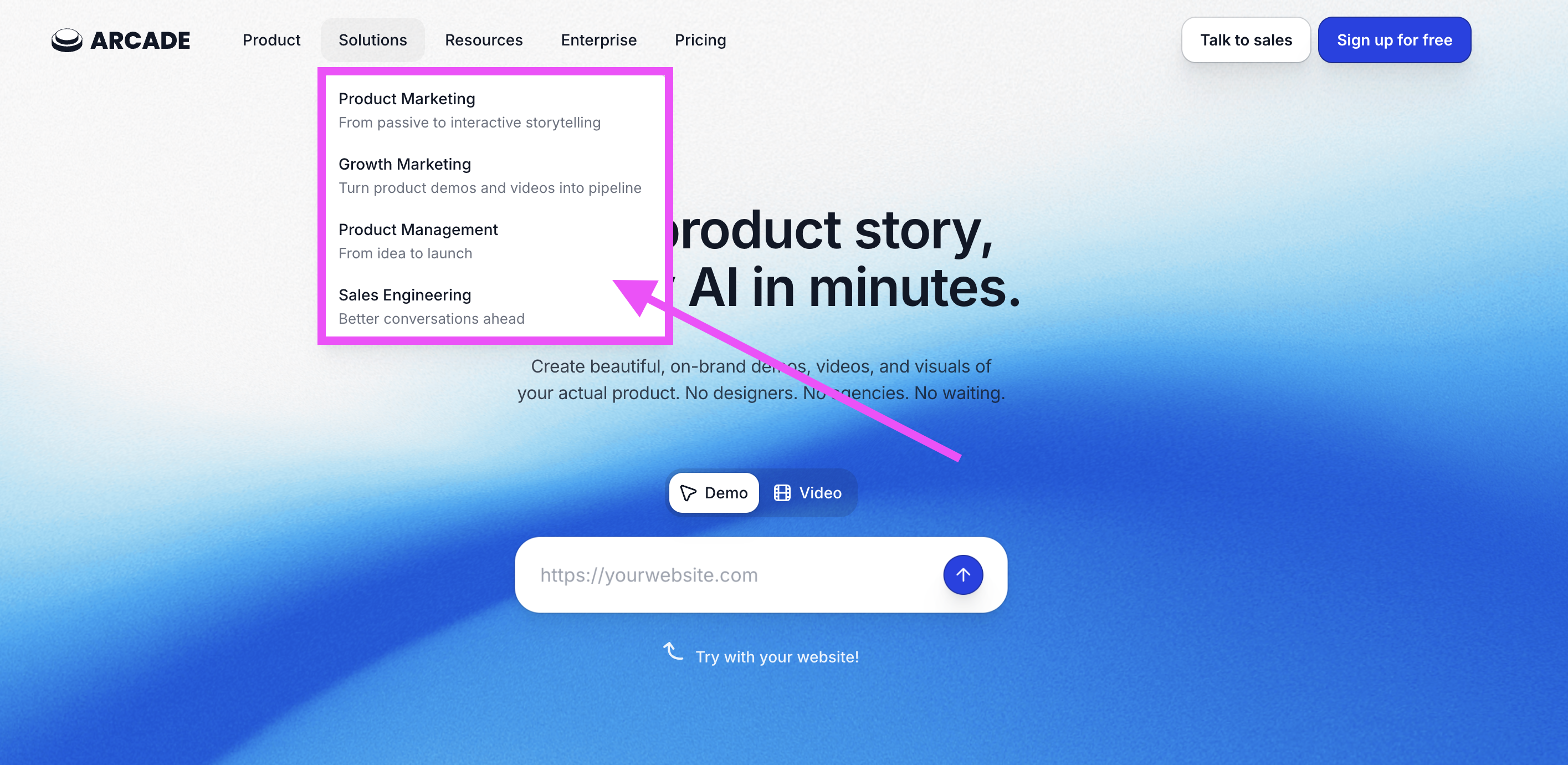
Here is Arcade’s own website and you can see the personas and solutions they solve for.
Where iorad fits
iorad is an interactive simulation tool for linear processes and software training. Instead of an open playground, it walks a learner through a defined workflow one step at a time, then has them do it themselves. The path is locked, standardized, and consistent on purpose. That structure is what builds muscle memory, the difference between someone who has seen a process and someone who can actually run it.
iorad is the right call when you:
- Train people on how to complete specific, often complex, workflows
- Need the experience to be guided, accurate, and the same for everyone
- Run onboarding, upskilling, or rollouts of new tools across a team or department
- Support customers and want interactive help content that cuts tickets
- Standardize processes across IT, operations, or support without constant re-training
- Operate in a high-change environment where steps evolve and documentation has to keep up
iorad tutorials carry more instructional weight: voiceover, video per step, interactive practice, and outputs you can embed in your LMS, knowledge base, or the software itself. When the steps have to be right, and the audience has to retain them, that is the job iorad is built for.
Here's an interactive tutorial
Here's an interactive tutorial
iorad is interactive and can be clicked through in real time. Notice that it does not let you wander. It moves you through the exact steps, in order, until the task is done.
Which one fits your job best
Same starting point, different jobs. Here is how the two line up across what actually matters, with no winner and no loser, just the fit.
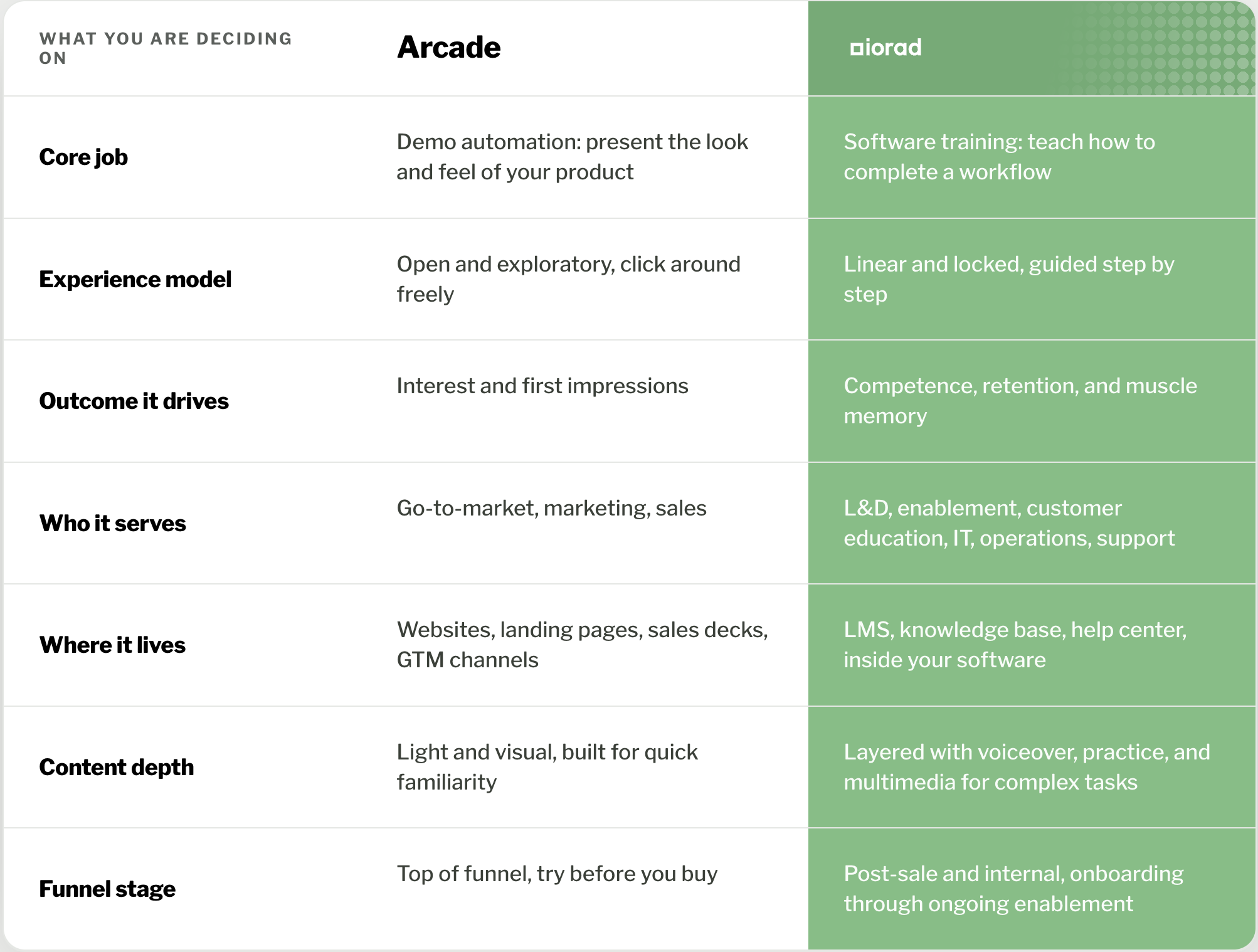
Read down the column that matches your team. If you live in the left column, Arcade is your tool. If you live in the right column, iorad is your tool. Most teams know which side they are on by the second row.
What about pricing
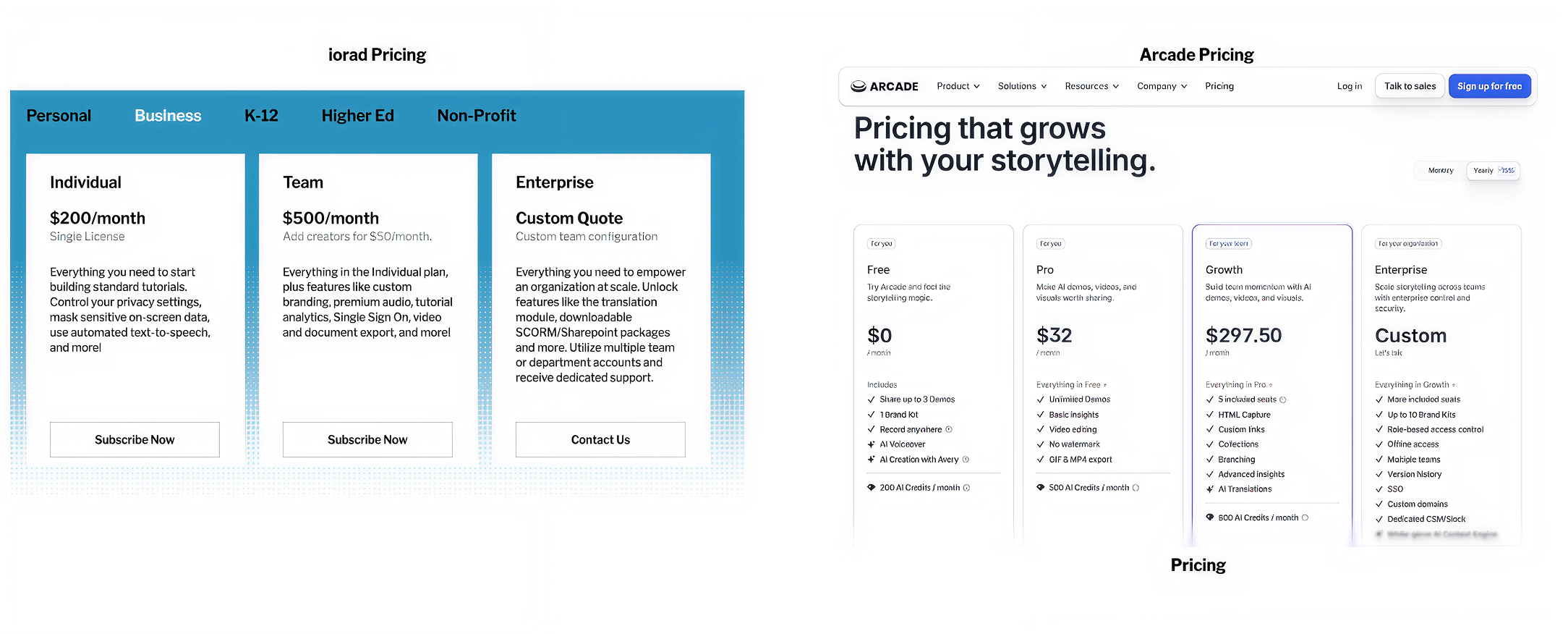
Arcade is lighter upfront. It offers a free plan limited to three demos, a pro plan from around $32 for individuals, and team plans from around $292. That fits individuals, small teams, and tighter budgets that need demos and not much else.
iorad starts around $200 per month for a creator license. The number looks higher until you remember the two tools are doing different work. Arcade gets a prospect interested. iorad trains a workforce or a customer base and keeps that training current as your software changes. For teams where onboarding volume, ticket deflection, and consistent execution translate into real money, the investment pays back through hours not spent repeating yourself and errors not made in the first place.
Different goals, different price tags. Neither is overpriced for the job it is built to do.
Final verdict
Both tools turn your product into interactive content. The right one comes down to the job, not the feature count.
Choose Arcade if you:
- Need interactive product demos for prospects
- Care about visual storytelling and engagement
- Run a product-led or sales-led motion
- Want self-serve demos embedded in your GTM channels
Arcade is the fit when you want someone to explore your product and form a first impression in a safe, simulated space.
Choose iorad if you:
- Need to train a defined audience on specific software workflows
- Want the experience guided, locked, and identical for everyone
- Run onboarding, support, enablement, or customer education
- Need content that lives in your LMS, knowledge base, or the software itself
- Want training that builds retention and actually changes behavior
iorad is the fit when the goal moves past interest and into competence: here is exactly how you do this, until your people can do it without thinking.
If you want an open-ended sample of what it feels like to be inside a tool, reach for a demo automation platform like Arcade. If you want to drive how someone completes a real task in real software, that is iorad.
